
Flashlight Simulator · Signal Beacon
Dynamic lighting modes · Battery simulation · Real-time beam control
This free online tool turns your browser into a realistic Morse code flashlight. Send signals using screen flashes, strobe patterns, or SOS Morse code. Built for ham radio operators, scouts, emergency preparedness, and Morse code learners.
The simulator follows standard Morse timing conventions and is designed for educational and practice purposes.
How to Use the Morse Code Flashlight
- Select a mode from the grid (Standard, Strobe, SOS, Police, Candle, Disco, Color).
- Adjust brightness and beam size with sliders.
- Watch battery level – high-power modes drain faster.
- Go full-screen for maximum signal range (click “Screen Fill”).
- Press Space to toggle modes or Escape to exit full-screen.
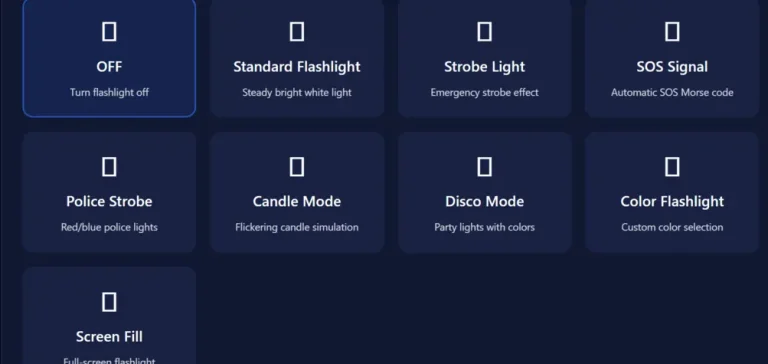
SOS Morse Code Mode
The SOS pattern (… — …) transmits automatically. Used worldwide in emergencies, the sequence repeats with proper timing for real signaling practice.
Why This Morse Code Flashlight Tool?
- No downloads or apps required – works on any browser.
- Realistic battery simulation shows power management in field conditions.
- Adjustable speed and color for different signaling needs.
- Part of MorseCodeReader.com – trusted by thousands for Morse learning tools since 2024.
Real-World Uses
- Practice signaling during camping or hiking.
- Test emergency protocols without draining your phone battery.
- Teach Morse code visually to students or scout groups.
Limitations
This is a simulation. Actual flashlight performance depends on your device screen brightness and visibility conditions. For professional use, always carry a dedicated signaling device.
Ready to signal? Activate the Morse code flashlight and practice real-world signaling directly in your browser.
Frequently Asked Questions
Conclusion
The Morse Code Flashlight Simulator is a practical, browser-based tool that delivers realistic light signaling with SOS, strobe, and custom modes — no downloads or apps required. It builds directly on core Morse code principles, offering reliable practice for ham radio operators, emergency preparedness, scouts, and anyone learning signaling techniques.
With accurate timing, adjustable brightness, and battery simulation, it’s a useful addition for real-world Morse code application. Add it to your home screen for quick access anywhere.
Try it now and practice sending signals the way it’s done in the field.