
Morse Code Light Translator & Decoder
Convert text messages into flashing light signals instantly, or use your live camera and tap tools to detect, read, and decipher flashing Morse code light signals online.
Flashing Light Decoder
Pause ~1s → letter end | Pause ~2s → word space
Type Morse code directly using . for dot,
- for dash,
space between letters,
/ between words.
Morse Code Reference Chart
Camera Decoder Guide
- Point your camera at any flashing light source
- Works with torch, phone screen, lamp, or signal light
- Auto-detects brightness changes as dots & dashes
- Adjust threshold if detection is too sensitive
Tap Decoder Guide
- No camera needed — works on any device
- Short tap = dot · Long press = dash —
- Release for ~1s to confirm a letter
- Release for ~2s to add a word space
Flash Light Encoder Workspace
Morse Code Reference Chart
How to Use
- Type any text — letters, numbers, punctuation
- Morse code auto-translates as you type
- Adjust the speed slider to your preference
- Hit Play Light to watch it flash
- Click any reference symbol to type it
Why Visual Morse?
- Ideal for deaf and hard-of-hearing learning.
- Great for emergency signaling environments.
What is a Morse Code Light Translator & Decoder?
Traditionally, Morse Code transmits text messages using a sequence of short and long signals. A Morse Code Light Translator & Decoder bridges the gap between physical light signals and digital text. Instead of relying purely on sound, it mirrors visual signaling methods—like the historic maritime signal lamps—allowing you to both generate and read flashing light sequences in real time.
This interactive utility is engineered to handle two distinct real-world needs:
- Translate Text to Light (Encoding): Type any message to convert it into standardized Morse code. Pressing play activates a simulated signal lamp that flashes the exact dots and dashes using precise, real-world transmission timing.
- Decode Flashing Light to Text (Decoding): Encountering a mysterious flashing light sequence? Use your device’s live camera feed or the manual tapping interface to capture, analyze, and instantly decode blinking light signals back into readable English text online.
How do I use the live camera to decode Morse code light flashes?
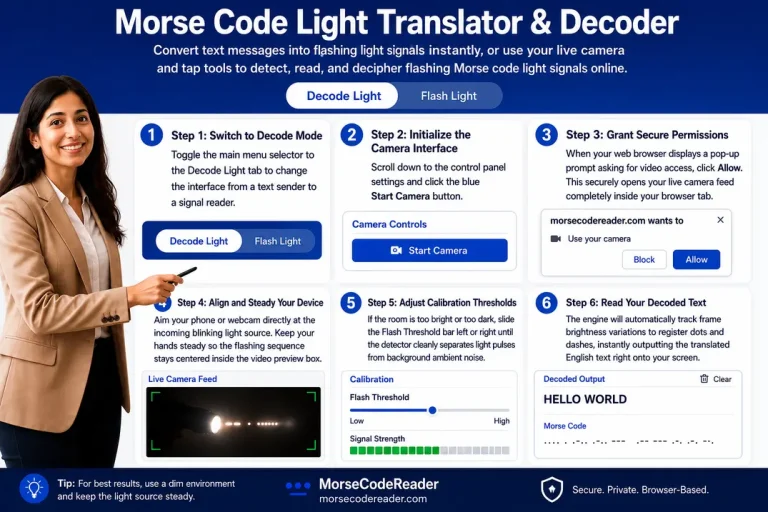
1. Switch to Decode Mode:
Toggle the tool workspace by selecting the “Decode Light” tab option. This reconfigures the UI interface from text transmission over to input recognition.
2. Grant Secure Camera Permission:
Click the “Start Camera” button on your dashboard. Your browser will prompt you for video access permissions; accept to initialize the live stream capture frame securely.
3. Align and Steady the Lens:
Aim your device’s lens directly at the blinking target. Keep your hands completely steady, ensuring the flashing light sequence occupies the center of your preview grid view.
4. Auto-Capture Optical Pulses:
The engine continuously tracks live pixel changes in frame brightness. It measures the precise duration of bright intervals to separate individual dots from longer dashes automatically.
5. Read Real-Time Translation:
Watch the data stream box below the video interface. The platform instantly pairs incoming flash metrics against standard Morse code matrices, rendering decoded English text right on your screen.

Why is a Morse Code Light Converter Important?
Light-based Morse communication is an invaluable tool for visual accessibility, real-world utility, and emergency preparedness. By shifting the communication medium from sound to light, it allows individuals—including those within the deaf and hard-of-hearing communities—to practice, transmit, and read Morse code seamlessly through sight.
Beyond accessibility, mastering both sides of a light-based converter is critical for real-world scenarios:
In critical situations, the internationally recognized SOS distress signal (… — …) is often broadcast using flashlights or mirrors when networks fail. Knowing how to quickly flash an emergency beacon—and how to decode an incoming light signal from a distance—can be life-saving.
Historically, naval operators and signal corps relied on directional signal lamps to flash silent messages across vast distances without revealing coordinates through audio. Modern enthusiasts and professionals use visual tools to train their eyes to recognize these precise rhythms.
Whether deciphering a hidden flashing sequence in an alternate reality game, interpreting an indicator status light on a malfunctioning piece of hardware, or reading an optical field signal, browser-based online decoding utilities completely eliminate the human error of manual translation.
Ultimately, learning to interpret Morse code visually builds superior pattern recognition and timing accuracy, preparing you to both broadcast your own signals and decipher incoming flashes whenever communication lines go dark.
Light-based Morse translation is especially valuable for people with hearing impairments. Instead of relying on sound, they can practice and understand Morse Code through visual cues—flashes of light that represent the precise timing and rhythm of dots and dashes. This aligns with principles of visual accessibility, making Morse learning more accessible, inclusive, and easier to interpret through sight rather than sound.
How Can a Morse Code Light Translator Help You?
If you’re passionate about learning Morse Code, practicing with a light translator adds a fresh dimension to your skills. It trains you to recognize and decode Morse signals visually—flashes that represent dots and dashes with precise timing—alongside the traditional sound-based method used in radio communication. This strengthens your understanding of signal patterns, rhythm, and spacing, which are essential for accurate decoding.
By combining visual learning with timing-based recognition, the tool supports better retention and pattern recognition, similar to how operators historically used a signal lamp for silent communication. This makes the learning process more versatile and engaging, especially for those practicing in quiet environments or focusing on accessibility through visual accessibility.
Why Visual (Light) Morse Code?
- Ideal for deaf or hard-of-hearing learners, as it removes reliance on sound and instead uses Morse Code through clear, timed light flashes—supporting inclusive learning aligned with visual accessibility.
- Practice silently (classroom, library, bedtime) without headphones or speakers, making it perfect for noise-sensitive environments while still reinforcing timing, spacing, and pattern recognition essential for accurate Morse decoding.
- Realistic simulation of wartime/naval signaling lamps, similar to how operators used a signal lamp to transmit messages visually across long distances, including critical signals like the SOS distress signal.
- Fun and engaging alternative to audio beeps, turning traditional learning into an interactive visual experience that improves retention, focus, and real-world signal recognition skills.
FAQs
Conclusion
Whether you have impaired hearing or simply want to explore how Morse Code light translation works, the above tool is designed to facilitate you through clear, timed visual signals. If you are confused, a step-by-step guide on how to use the tool is also provided, along with a complete reference table to help you understand dots, dashes, and their timing patterns.
By combining learning with visual interaction, you can practice, learn, and discover some of the most practical and fascinating ways Morse Code can be used—from accessibility-focused communication to real-world signaling methods like the signal lamp and emergency patterns such as the SOS distress signal.
If you want to practice, learn and discover some of the most amazing ways Morse Code can be used, you can access our Morse Code translator.